31 Dec 2021
Intro
In 2020, I managed to squeeze out just one post. Well, 2021 ran out just as fast as 2020. So here we
are:
   2020-12-31-happy-new-year.md
  +2021-12-31-happy-new-year.md
This year, I'll review a really cool package I've found. It's not new, I just didn't manage to
stumble upon it over the years. So it's new to me, and might be a useful pointer to others as well.
Emmet-mode
Emmet-mode is a wonderful Emacs package which greatly
improves HTML code generation. It's based on Emmet, so you can read up on the
syntax here. I've discovered it quite recently after
reading Arjen Wiersma's
22-years-of-emacs.
The gist is that ul#nav>li.item$*4>a{Item $} will expand to:
<ul id="nav">
    <li class="item1"><a href="">Item 1</a></li>
    <li class="item2"><a href="">Item 2</a></li>
    <li class="item3"><a href="">Item 3</a></li>
    <li class="item4"><a href="">Item 4</a></li>
</ul>
The above reminded me of tiny.el,
the concept of using *4 to create four items, and $ for automatic numbering is very similar.
Emmet goes above and beyond the 3 yasnippets I had in my
config for inserting HTML tags. Note also the handy html:5 snippet, which expands to:
<!doctype html>
<html lang="en">
  <head>
    <meta charset="UTF-8"/>
    <title>Document</title>
  </head>
  <body></body>
</html>
And as a cherry on top, when used in clojure-mode, these snippets will produce hiccup.
Getting emmet-mode for free
As I wrote earlier (feels like ages ago), I like to
get functionality for free, i.e. without having to sacrifice any old key bindings or learning new
key bindings. So I've integrated the code of emmet-expand-line with C-o (ora-open-line).
Here is the relevant cond branch:
((and
  (require 'emmet-mode)
  (setq expr (emmet-expr-on-line))
  (setq markup (emmet-transform (first expr))))
 (delete-region (second expr) (third expr))
 (emmet-insert-and-flash markup)
 (emmet-reposition-cursor expr))
We check if emmet-mode has detected a valid snippet at point. In that case, expand it. This allows
us to chain multiple snippet engines (like yasnippet, auto-yasnippet, tiny, emmet-mode), and
even provide a hydra as a fallback for even more easy to reach commands on C-o!
Personal
Our son, Lev, was born on May 7, 2021. He is our love, happiness, our shining light in 2021.
And also the reason why I didn't have too much free time to do Emacs stuff.
Big thanks to Basil L. Contovounesios for helping me maintain Ivy!
I'm hoping to be much more active on Github in 2022.

In other personal news, I'm currently looking for a new job as a Software Engineer. If you'd like
me to work with you, please get in touch via LinkedIn or
Twitter. Also, a big thanks to everyone
donating to support my open-source work. It means a lot.
Outro
I wish everyone reading this good health in 2022! And happy hacking!
31 Dec 2020
Intro
As 2020 is almost running out, I have noticed that I didn't manage to post anything this year. So
here's a haphazard attempt to fix that.
Org-roam
I'd like to share a wonderful Emacs package I've started using this year:
org-roam. Even though in my Org notes I see that I
encountered this package in February 2020, I've actually started using it on December 10, trying to
figure out what Zettelkasten are and how to deal with
them.
Overall, 22 days isn't a whole lot of experience, and I'm looking forward to see how useful
Zettelkasten and org-roam will be to me in a year. But I already have written down 341 notes,
which amounts to around 15 notes per day.
In my previous/current system, plain-org-wiki, I
organize my knowledge into 209 tag categories. For instance, one of them, Linux, has 290
entries. Another, VPN, has 15 entries. I'll show an example of how org-roam improved my workflow
by showing a note I've added:
#+title: Use a custom DNS when resolving a specific host on Linux
On Linux, I have a DNS server that can resolve certain VPN-only websites. But the problem is
that it's only available if I'm connected to my work VPN. So I can't configure it in a common way,
since the common way would simply use that DNS always, whether or not it's up. The =dnsmasq=
package solves all these issues.
The code: local, and permalink
Above is one zettel - a note named "Use a custom DNS when resolving a specific host on Linux" that's
liked to two other notes: "Linux", and "DNS". Both of those notes are basically empty files that are
used for tagging purposes. I use M-x org-roam-buffer-activate to see what other notes
are linked to them.
Suppose, instead of using org-roam, I wanted to add the above piece of knowledge to my old system
of tagged data. Does this information belong in Linux.org or in VPN.org? Moreover, do I really
want to add one more entry to Linux.org? It's getting really crowded with 290 entries already
there. So with the old system, it's the anxiety on where to put the note combined with the pressure
of keeping it short. Both things are solved by using Zettelkasten!
Org-roam config
Here's my config for
org-roam
so far.
All of the functionality that I use is in the hydra below:
(defhydra hydra-org-roam (:exit t :idle 0.8)
  "Launcher for `org-roam'."
  ("i" org-roam-insert "insert")
  ("f" ora-org-roam-find-file "find-file")
  ("v" org-roam-buffer-activate "backlinks")
  ("t" ora-roam-todo "todo"))
The only difference between ora-org-roam-find-file and org-roam-find-file is that my variant
supports ivy actions.
And ora-roam-todo is a small wrapper around this code, which gives me an overview of loose ends in
my notes that I'd like to follow up on:
(progn
  (setq unread-command-events
        (listify-key-sequence (kbd "C-c C-o M->")))
  (counsel-rg "^\\* TODO" org-roam-directory "--sort modified"))
What the above does technically: runs counsel-rg on my org-roam-directory looking for * TODO,
while sorting on the file modification date, instead of the default sorting by path. Here, C-c
C-o is the binding of ivy-occur, and M-> is end-of-buffer. And the whole code
overall produces an ivy-occur buffer without having to go into minibuffer and press C-c
C-o manually. The unread-command-events trick is a nice way to automate this.
Outro
I'd like to thank the creators of org-roam. Well done!
Happy New Year! I wish everyone good health, justice, equality, and happiness!
16 Oct 2019
Intro
Ivy is a completion method that's
similar to Ido, but with emphasis on simplicity and customizability.
Overview
The current release constitutes of 183 commits and 3 months of
progress since 0.12.0. Many issues ranging from
#2153 to
#2278 were fixed.
The number of people who contributed code as grown to form 148 to
160. Thanks,
everyone!
Details on changes
Changelog.org has been a part of the repository since 0.6.0, you
can get the details of the current and past changes:
Highlights
Many improvements are incremental and don't require any extra code to
enable. I'll go over a few selected features that require a bit of
information to make a good use of them.
New bindings
counsel-find-file
- ~~ to move to the local home directory from remote or
/sudo::.
- / RET ~ achieves the same thing, but is longer.
- M-o R calls
find-file-read-only.
counsel-git-grep
- C-x C-d to switch the current directory.
swiper-isearch
- M-o w to copy the current line and go back to where you started.
New features
counsel-package
The idea of counsel-package is to install and remove packages with a single binding:
(global-set-key (kbd "C-c P") 'counsel-package)
But if the package contents weren't up to date, a separate M-x package-refresh-contents
had to be triggered, which was an annoying overhead. Now counsel-package will look at the time
stamps of the appropriate archive-contents files, and call package-refresh-contents if the
timestamp is outdated by more than 4 hours.
counsel-M-x
Some commands are intended to be called only via their key binding. Make them disappear
from counsel-M-x like this:
(put 'counsel-find-symbol 'no-counsel-M-x t)
counsel-rg
The default setting of ivy-case-fold-search-default is 'auto, which means:
- the input "emacs" matches "emacs", "EMACS", and "Emacs"
- the input "Emacs" matches only "Emacs"
This now also applies to counsel-rg: Ivy will pass the -i flag to ripgrep appropriately, based
on ivy-case-fold-search-default. You should remove the -S flag from counsel-rg-base-command if
you customized it.
ivy-update-candidates
This is a new API for asynchronous calls. To use it, pass to ivy-read: :dynamic-collection t,
and a collection function that takes a user input string, starts some asynchronous process based on
that input, and returns 0. The 0 return result tells Ivy that no candidates were returned;
instead, ivy-update-candidates is used in the async callback.
See counsel-google for a reference implementation.
ivy-use-virtual-buffers
You can now choose between: recent files, or bookmarks, or both, or none. Don't forget that
counsel-set-variable makes it very easy to set customization options.
New Commands
I have put these separately so they don't get lost in the crowd. Be sure to try them out.
counsel-buffer-or-recentf - list buffers visiting files (highlighted) then the recentf file
list.counsel-fonts - show a list of all supported font families for a particular frame.counsel-google - asynchronously query the Google predictive search API.counsel-major - switch major-mode.counsel-slime-repl-history - browse SLIME REPL history.
Outro
Again, thanks to all the contributors. Happy hacking!
PS. Thanks to everyone who supports me on Liberapay and
Patreon!
I am now also on Github sponsors, which is an
interesting new effort by Github. The cool thing is that's more integrated with Github, there are
less transaction fees, and Github matches every donation for up to $5000 for a whole year.
Please consider joining there, since every $1 per month that you donate is doubled by Github.
20 Jul 2019
Intro
Ivy is a completion method that's
similar to Ido, but with emphasis on simplicity and customizability.
Overview
The current release constitutes of 398 commits and 6 months of
progress since 0.11.0. Many issues ranging from
#1904 to
#2151 were fixed.
The number of people who contributed code as grown to
148. Thanks,
everyone!
Details on changes
Changelog.org has been a part of the repository since 0.6.0, you
can get the details of the current and past changes:
Highlights
Many improvements are incremental and don't require any extra code to
enable. I'll go over a few selected features that require a bit of
information to make a good use of them.
New bindings
counsel-descbinds
counsel-file-jump
counsel-find-file
- M-o c copy file.
- ` bookmarks: efficiently jump between recent directories.
- $ directories stored in environment variables.
- C-DEL go up directory. Customize:
counsel-up-directory-level.
- RET open file. Customize:
counsel-find-file-extern-extensions.
- // when on remote, cd to remote root.
- / C-j select local root.
- ~ when on remote, cd to remote home.
- / C-j ~ cd to local home from remote.
counsel-git-log
- M-o v open the current commit in
magit.
counsel-rg
- C-x C-d change the current directory for grep.
ivy-avy
- C-v to scroll down.
- M-v to scroll up.
ivy-read C-o
- m mark and move down.
- u unmark and move down.
- DEL move up and unmark.
- t toggle marks.
- d perform the action on all marked elements.
ivy-switch-buffer
- C-k kill buffer.
- M-o x open buffer file externally.
ivy-reverse-i-search
- C-k remove item from the history.
New Commands extensions
These commands are new variants and adaptations of existing commands.
Thing at point variants:
swiper-all-thing-at-point.swiper-isearch-thing-at-point.swiper-thing-at-point.
Search variants that go backwards:
swiper-backward.counsel-grep-or-swiper-backward.swiper-isearch-backward.
A variant of ivy-switch-buffer with live preview:
counsel-switch-buffer.counsel-switch-buffer-other-window.
And finally:
counsel-dired - like counsel-find-file, but open dired.swiper-isearch-toggle - toggle between swiper and isearch.
New Commands
I have put these separately so they don't get lost in the crowd. Be sure to try them out.
counsel-compile - completion for compile.counsel-register - completion for registers.counsel-minor - completion for minor modes.swiper-isearch - a faster swiper that's not line-based.
Outro
Again, thanks to all the contributors. Happy hacking!
09 Jul 2019
Introduction
I'm sure many are aware of the C-r functionality in bash (a whole lot of Emacs
bindings are valid in bash and do the same thing). I also like the quirky Emacs-style prompt, that
uses a backquote to open and a straight quote to close a your quoted input:

So when you want to cd to somewhere where you were before you do C-r cd. And then the
C-r "roulette" begins: you keep pressing C-r over and over, in the hopes to find
what you were looking for.
Getting better history completion with Ivy
Ivy improves the "roulette" situation in two ways:
- You get an overview of the matching candidates and their count,
- You can quickly narrow down the candidates with fuzzy matching.
Here's the basic setup to enable C-r completion using ivy:
(define-key minibuffer-local-map
    (kbd "C-r") 'counsel-minibuffer-history)
(define-key shell-mode-map
    (kbd "C-r") 'counsel-shell-history)
The first key binding is also part of counsel-mode, while the second needs to be set up separately,
after shell-mode was loaded.
And here's how counsel-shell-history looks like:

The cool thing is that ivy-reverse-i-search applies to any Ivy command, not just for shell
command completion. I find it especially useful for:
counsel-find-fileeval-expression
Recent improvement: delete history items
While searching with regexes is great, it's not so great when the old stuff that we won't ever need
gets in the way. So now you can delete it with C-k. Since C-k also has to
serve as ivy-kill-line, the history deleting behavior will only come into effect when the point is
at the end of the line (so that ivy-kill-line does not make sense anyway).
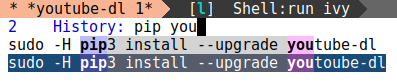
This way, your typos don't stay around to haunt you.
Outro
I hope you'll find ivy-reverse-i-search a useful boost to your completion needs. Happy hacking!
